Downloadable Checklists
Downloadable Checklists
Downloadable Checklists
Practical Tools to Get Inclusive Playground Design Right
Designing an inclusive playground is complex.
There are many factors to consider:
Access
Surfaces
Equipment
Sensory needs
Social inclusion
Small details matter.
That’s where checklists become powerful.
They turn complex design into clear, actionable steps.
Why Use a Checklist?
Inclusive playgrounds often fail not because of intention but because of missed details.
Checklists help ensure:
 Nothing is overlooked Design decisions are consistent Accessibility is built in from the start
Design guides recommend using structured checklists to ensure all aspects of accessibility, movement, and play are considered during planning.
A checklist turns good ideas into real-world outcomes.
The Key Principle: Inclusion Is a System
Inclusive playground design is not one decision.
It is a combination of:
Layout
Movement
Communication
Equipment
Experience
Checklists help ensure these elements work together as one system.
If one part is missed, the whole experience can fail.
What Our Checklists Are Designed For
These downloadable checklists are designed to help:
Councils
Plan and review playground projects
Schools and communities
Advocate for inclusive design
Playground designers
Ensure nothing is missed
Funders and decision-makers
Assess quality and value
These are practical tools, not theory.
What the Checklists Cover
1. Access and Movement
Ensuring users can:
Arrive
Enter
Move through the space
Checklist items include:
Continuous accessible pathways Adequate width and turning space Clear connections between areas
Inclusive design guidance highlights that users must be able to get around easily and access all areas of the playground.
2. Surfaces and Ground Conditions
The surface determines whether a playground works.
Checklist items include:
Firm, stable surfaces No loose materials blocking access Smooth transitions between surfaces
Loose or unstable surfaces are widely recognised as barriers to accessibility.
If the surface fails, everything fails.
3. Play Equipment and Usability
It is not enough to install equipment.
Users must be able to use it.
Checklist items include:
Ground-level play options Accessible elevated play Equipment usable from multiple positions
Checklists often include requirements such as ground-level accessibility and play from multiple sides.
4. Space and Manoeuvring
Good equipment fails without space.
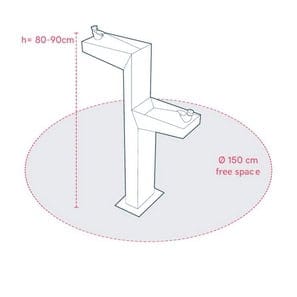
Checklist items include:
Turning circles Hardstand areas Space for carers and assistance
Space is what makes equipment usable.
5. Sensory and Neurodiverse Design
Inclusive playgrounds must support:
Different sensory needs
Different ways of engaging
Checklist items include:
Quiet spaces Movement-based play Sensory variation (visual, tactile, movement)
Inclusive design frameworks recommend providing both active and quiet play opportunities.
6. Social and Inclusive Play
Play must allow:
Interaction
Choice
Different participation styles
Checklist items include:
Shared play opportunities Parallel play options Inclusive group equipment
Inclusion happens through participation.
7. Communication and Wayfinding
Users must understand the space.
Checklist items include:
Clear layout Visual communication Tactile or sensory cues
Some checklists include features like orientation aids, signage, and communication supports.
8. Safety and Real-World Use
Design must work in real conditions.
Checklist items include:
Clear sightlines Safe transitions No hidden hazards
Safety must be built into the design, not added later.
9. Arrival and Parking
Access starts before the playground.
Checklist items include:
Mobility parking Access aisles Drop-off areas Accessible routes to the playground
If users cannot arrive safely, nothing else matters.
How to Use These Checklists
These checklists can be used at multiple stages:
Planning Stage
Guide early design decisions
Identify potential issues
Design Review
Check drawings and layouts
Ensure compliance and usability
Community Advocacy
Support funding requests
Show what is required
Final Inspection
Confirm real-world usability
They are designed to be used throughout the entire project
Why Downloadable Tools Matter
Downloadable checklists allow you to:
Share with teams and stakeholders Use in meetings and planning sessions Apply consistently across projects
They turn inclusive design into something that is:
Repeatable, measurable, and achievable.
The Problem Without Checklists
Without structured tools:
 Key elements are missed Designs rely on assumptions Accessibility becomes inconsistent
Even well-intentioned projects can fail because details were overlooked.
Designed from Real-World Experience
These checklists are built from:
Lived experience of disability
Real-world design failures
Practical usability issues
They focus on what actually works, not just what looks good.
The Bigger Picture
Checklists are not just documents.
They are:
Decision-making tools
Advocacy tools
Quality control tools
They help ensure playgrounds are:
Usable Inclusive Successful
Key Takeaway
Inclusive design requires attention to detail Checklists prevent critical mistakes Consistency leads to better outcomes
If you don’t check it, you can’t guarantee it works.
Call to Action
Download and use these checklists to:
Plan better playgrounds
Avoid common mistakes
Create truly inclusive spaces
Because:
Inclusive playgrounds don’t happen by chance; they happen by design.