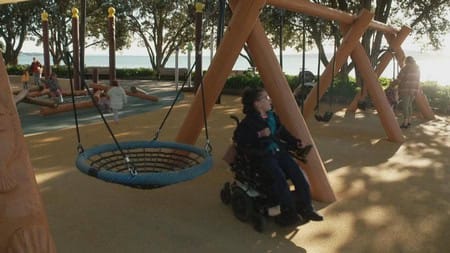
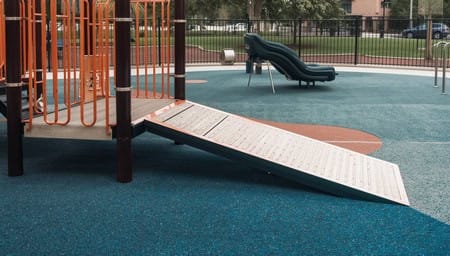
Common Playground Design Mistakes
Common Playground Design Mistakes
Why This Matters
Most playgrounds are not failing because of one big issue.
They fail because of many small decisions.
Design choices that seem acceptable on paper often create real barriers in use.
Research shows that common mistakes, such as poor layout, inaccessible surfacing, and focusing on appearance over function, can significantly reduce usability and safety.
Inclusive design is not about avoiding obvious failures.
It is about avoiding the subtle ones.
Focusing on Equipment Instead of Experience
One of the most common mistakes is treating a playground as a list of equipment.
Swings, slides, towers — done.
But research shows that focusing on equipment instead of how the space is used leads to poor outcomes.
A playground is not defined by what is installed.
It is defined by how people move, interact, and participate.
Choosing Quantity Over Quality
Budgets often drive decisions.
More equipment for the same money often wins.
But this creates:
Cluttered spaces
Reduced usability
Lower quality outcomes
Overcrowding and “more for the money” approaches reduce safety and limit movement.
Less, done properly, is more inclusive.
Treating Accessibility as an Add-On
A common mistake is adding one “accessible” item and considering the job done.
This leads to:
Isolated equipment
Segregated play
Limited use
Research highlights that treating accessible equipment as a standalone feature can actually exclude users rather than include them.
Inclusion must be built into the whole space.
Inaccessible Surfacing
Surfacing is one of the biggest failures.
Common mistakes include:
Using bark or loose fill
Ignoring transitions
Choosing surfaces not fit for purpose
Loose or inappropriate surfaces create barriers for mobility devices and reduce safety.
If people cannot move, they cannot participate.
Designing to Minimum Standards
Meeting standards is not the same as creating inclusion.
Minimum standards:
Allow access
Do not guarantee usability
This leads to spaces that:
Technically comply
But fail in real use
Inclusive design must go beyond minimums.
Ignoring Real-World Use
Design often assumes:
Perfect conditions
Clear paths
No wear over time
Real playgrounds are:
Busy
Dynamic
Imperfect
If a design only works in ideal conditions, it will fail in reality.
Poor Layout and Flow
Layout is one of the most common issues.
Problems include:
Disconnected areas
Dead ends
Confusing pathways
Research shows that poor layout and a lack of clear flow reduce usability and increase safety risks
If people cannot move easily, they will not stay.
Lack of Clear Sightlines
Caregivers need to see.
Children need to feel visible and safe.
Poor visibility creates:
Safety risks
Reduced supervision
Lower confidence
Design guidance highlights that blocked sightlines are a common and avoidable mistake.
If people cannot see, they hesitate.
Ignoring Maintenance and Lifecycle
Some designs only consider installation.
They ignore what happens over time.
This leads to:
Surfaces breaking down
Accessibility being lost
Increased long-term costs
Failing to plan for maintenance reduces both safety and usability.
Accessibility must last, not just exist at opening.
Token Features Without Function
Some features are added to “look inclusive”.
But they:
Are difficult to use
Feel unsafe
Do not support real interaction
Research identifies “token features without functional value” as a key mistake in inclusive design.
If something is not usable, it is not inclusive.
Overlooking Sensory and Social Needs
Inclusive design is not just physical.
Mistakes include:
Overstimulating environments
No quiet spaces
Lack of social play opportunities
A lack of balance can overwhelm users and reduce participation.
Inclusion must consider how people feel, not just how they move.
Designing Without Lived Experience
One of the biggest mistakes is designing without input from real users.
This leads to:
Assumptions instead of reality
Missed barriers
Poor usability
Inclusive design requires understanding real-world experience.
Without it, mistakes are repeated.
The “Looks Good” Problem
Some playgrounds are designed to look impressive.
But appearance does not equal usability.
Visually appealing equipment can still be:
Unsafe
Difficult to use
Avoided
Design must prioritise function over appearance.
The Cost-Driven Compromise
Lower cost often leads to:
Reduced quality
Simplified design
Less usable equipment
This creates spaces that:
Meet budget
But fail users
Cheap decisions often become expensive mistakes over time.
If It’s Not Used, It’s Not Inclusive
A common misunderstanding is:
“People are not using the accessible equipment".
The reality is:
It is not being used because it does not work.
Because it feels unsafe.
Because it is difficult.
Because it creates barriers.
Use is the only true measure of inclusion.
A Lived Experience Reality
From lived experience, mistakes are obvious.
You see:
Where people hesitate
Where they avoid
Where they turn back
You do not need a report.
You see it in behaviour.
Final Thought
Most playground design mistakes are preventable.
They are known.
They are repeated.
They are avoidable.
Inclusive design is not about doing more.
It is about doing things properly.
Because every mistake becomes a barrier.
And every barrier excludes someone.